Install openssh#
Update first
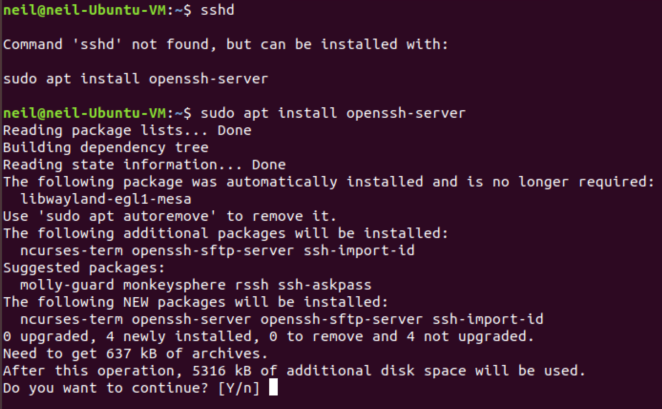
Install openssh-server
1
| sudo apt install openssh-server -y
|
Usage#
Check IP by
If you got this:
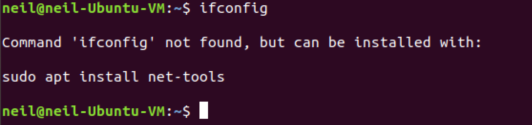
Install ifconfig by
1
| sudo apt install net-tools -y
|
Or use the command to get your IP address
And connect via
1
| ssh <username>@<hostname>
|
Or
1
| ssh <username>@<hostname> -p <port>
|
To using default 22 port to connect

Enable ssh service start on boot:
1
| sudo systemctl enable ssh
|
Let firewall allow ssh service
1
2
3
| sudo ufw allow ssh
# or
sudo ufw allow 22
|
Allow root login#
1
2
| sudo vim /etc/ssh/sshd_config
# change "PermitRootLogin no" to "PermitRootLogin yes"
|
ssh keyless login#
Create ssh rsa key on the computer you want to connect to host
 1
 2
 3
 4
 5
 6
 7
 8
 9
10
11
12
13
14
15
16
17
18
19
20
21
22
23
| [[email protected] ~]$ ssh-keygen -t rsa
Generating public/private rsa key pair.
Enter file in which to save the key (/home/neil/.ssh/id_rsa): [Press enter key]
Created directory '/home/neil/.ssh'.
Enter passphrase (empty for no passphrase): [Press enter key]
Enter same passphrase again: [Press enter key]
Your identification has been saved in /home/neil/.ssh/id_rsa.
Your public key has been saved in /home/neil/.ssh/id_rsa.pub.
The key fingerprint is:
1f:ad:49:00:4a:d5:ab:99:b3:b0:f9:09:91:c4:ed:d2 [email protected]
The key's randomart image is:
+--[ RSA 2048]----+
| ..oooE.++|
| o. o.. |
| .. . |
| o . . o|
| S . . + |
| . . . o|
| . o o ..|
| + + |
| +. |
+-----------------+
|
Create .ssh Directory on host server
1
2
3
4
5
6
7
| [[email protected] ~]$ ssh [email protected] mkdir -p .ssh
The authenticity of host '192.168.50.6 (192.168.50.6)' can't be established.
RSA key fingerprint is 48:0e:28:11:d6:81:68:16:04:5f:db:49:02:la:12:4e.
Are you sure you want to continue connecting (yes/no)? yes
Warning: Permanently added '192.168.50.6' (ECDSA) to the list of known hosts.
[email protected]'s password: [Enter Your Password Here]
|
Copy public key from local to host server
On host server restart ssh service
On host server check ssh service status
